Most advice about growing on TikTok starts with the same assumption: point a camera at your face, hit the video record button, and start talking. If that idea makes you want to close the app, I have good news. You can build a real audience on TikTok without filming a single second of video, and without ever showing your face.
We all know that carousels are a powerful format for some social networks. Like a lot of you, I’ve dabbled. For Instagram, that meant casually stringing together a batch of photos from my camera roll. More recently, I’ve built more strategic PDF carousels for LinkedIn. TikTok as another home for carousels? I couldn’t picture it. But the secret’s out.
When I first heard that static photo posts were pulling serious numbers on TikTok, I was skeptical. A slideshow? On the app that made short-form video famous? The data changed my mind. So did watching a room full of authors at Author Nation talk about slideshows as their number-one marketing channel.
I’ve written six books on digital and social media marketing, including Digital Threads. I host the Your Digital Marketing Coach podcast, and I teach social media at Rutgers Business School and UCLA Extension. And I’m telling you: TikTok’s Photo Mode is one of the most underrated formats on the platform right now.
This guide is for anyone who wants to show up on TikTok without the pressure of video. That means authors promoting their books, small business owners with a camera roll full of product photos, and any creator who dreads being on camera. Here is exactly how to make a slideshow on TikTok, why the format works, and how to get more reach out of it.
Key Takeaways
? A TikTok slideshow (Photo Mode) lets you post up to 35 swipeable photos in a single post, no video required.
? To make one, tap the plus icon, open your camera roll, select your photos, and post. Uploading multiple photos at once gives you a swipeable slideshow, not an auto-playing video.
? Swipeable Photo Mode posts reward the reader for interacting, and that manual swiping is a signal the TikTok algorithm rewards with reach.
? Slideshows are the format quietly powering BookTok, because they let camera-shy authors and creators publish consistently without filming.
? If you already make carousels for Instagram or LinkedIn, you can repurpose them straight to TikTok with almost no extra work.
What is a TikTok slideshow?
A TikTok slideshow is a photo post, made with a feature called Photo Mode, that lets you share up to 35 still images in one swipeable post set to music. It is TikTok’s answer to the Instagram carousel. Instead of an auto-playing video, viewers swipe through your images at their own pace, one slide at a time.
TikTok introduced Photo Mode back in 2022, and it has quietly become one of the most-used formats on the app. You’ll recognize a slideshow when you see the little white dots at the bottom of a post, each dot standing for one image. The format is perfect for storytelling in sequence: a hook on slide one, a build in the middle, and a payoff at the end.
The appeal is simple. You don’t need a script, a ring light, or any video editing skills. If you can take a photo or design a graphic, you can make a slideshow. That low barrier is exactly why the format has spread so fast among people who never wanted to be TikTokers in the first place.
How do you make a slideshow on TikTok step by step?
Making a TikTok slideshow takes about a minute. Tap the plus icon, open your camera roll, and select your photos in the order you want them. Tap Next, then customize each slide with music and text as you like. Add your caption and post. Uploading photos this way gives you a swipeable slideshow, not a video.
Here is the full walkthrough:
- Tap the plus (+) icon at the bottom of the screen to start a new post.
- Tap the photo gallery icon in the bottom-left corner to open your camera roll. You can also grant TikTok access to selected photos only if you’d rather not share your whole library.
- Select your photos in order. The order you tap them is the order they appear in your slideshow. You can add up to 35 photos in a single post.
- Tap Next. TikTok often defaults to a video-style preview here, which is the step most people miss. This is where you add your music, text overlays, and stickers. You can drop text on individual slides to build your hook and your story.
- Tap Next, write your caption, add hashtags, and post.
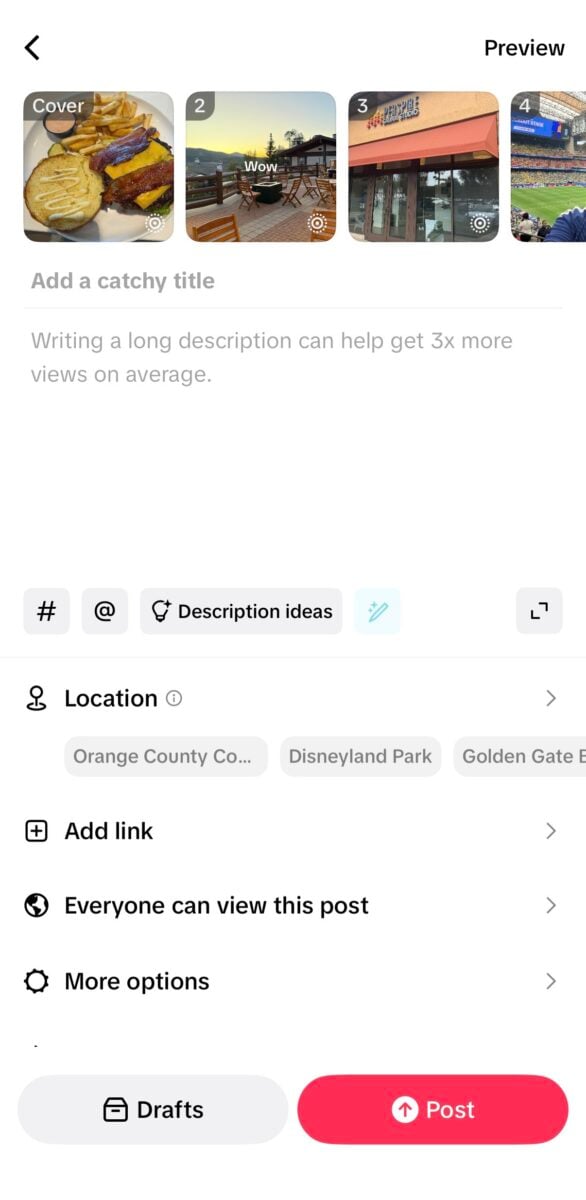 The review screen right before posting. When your slides appear as separate thumbnails across the top, you can be confident it will publish as a swipeable carousel, not a video.
This is what it should look like right before you post. If you see those separate images appear above the title and caption, you can rest assured that it will display as a carousel.
If you can’t post photos yet, don’t panic. TikTok rolls Photo Mode out gradually, so first make sure your app is updated to the latest version. If it still isn’t there, it may not have reached your account or region yet.
A note for your images: Aim for at least 1,080 by 1,920 pixels, a 9:16 vertical ratio, so they fill the screen. If you already export Instagram carousels or TikTok-ready graphics at that size, you’re set.
What’s the difference between Photo Mode and a video slideshow?
Photo Mode creates a swipeable post where the viewer controls the pace, while a video slideshow plays your photos automatically like a regular clip. The difference matters, because swiping is active engagement and passive watching is not. On TikTok, the swipeable version typically earns higher interaction and retention than an auto-transition video montage.
TikTok gives you two ways to turn photos into a post, and they behave very differently:
| Feature | Photo Mode (swipeable) | Template video slideshow |
|---|
| How viewers experience it | Swipe through images at their own pace | Watch photos auto-transition like a video |
| Engagement signal | Manual swiping counts as active interaction | Passive viewing only |
| Best for | Storytelling, hooks, curiosity, dwell time | Quick montages, music-led moments |
| Where you find it | Tap +, open the photo gallery, select multiple photos | Tap the plus icon, choose a Template |
| Typical retention | Higher, viewers linger to swipe | Lower, viewers scroll past faster |
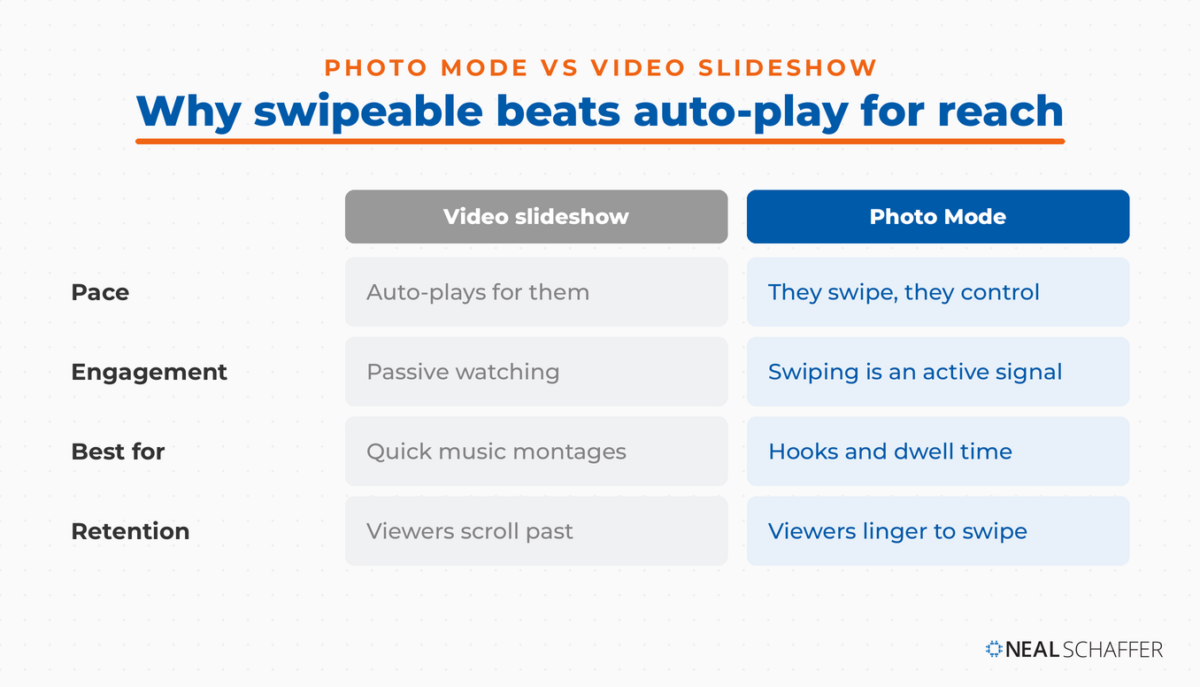 Photo Mode lets viewers swipe at their own pace, and that manual swiping registers as active engagement. For reach, the swipeable version almost always beats an auto-playing video slideshow.
If your goal is reach, the swipeable Photo Mode carousel is almost always the better choice. Templates are quicker, and they apply preset transitions and timing automatically, so they’re a fine starting point for beginners. But they trade away the interaction that makes the format work.
Why do TikTok slideshows get engagement if they aren’t videos?
TikTok slideshows earn engagement because swiping is an action. Every swipe tells the algorithm a viewer chose to spend more time with your post. A good slideshow makes people want the next slide, which stacks up dwell time and interaction, the two signals TikTok’s ranking system watches most closely.
This is the part that surprised me. TikTok is the most engaging major social platform, with engagement rates well ahead of other networks, according to Sprout Social’s 2026 data. People also spend more time per session there than almost anywhere else. My own look at TikTok’s numbers shows an average session of nearly 11 minutes, roughly double what Pinterest sees. A swipeable carousel taps directly into that behavior. Every slide is a tiny cliffhanger, and the reader keeps swiping to resolve it.
There’s a mechanical reason it works, too. When someone swipes back and forth, or lingers on a slide to read it, TikTok counts that as watch time and interaction. That feeds the TikTok algorithm the exact signals it uses to decide who else should see your post. A well-built slideshow can genuinely outperform a mediocre video, which is not something I expected to be writing a year ago.
What most people get wrong about TikTok slideshows
The biggest mistake is assuming you need to be on camera to succeed on TikTok. You don’t. The face-to-camera talking video is one format among many, and for a huge number of people it’s the wrong one. Slideshows let you show up consistently, tell real stories, and build an audience while keeping yourself entirely out of frame.
The LinkedIn Playbook for Real Business Growth
My latest book helps professionals, entrepreneurs, and business owners turn LinkedIn from a static profile into a real source of clients and growth.
Maximizing LinkedIn for Business Growth gives you clear, practical steps to build a profile that gets noticed and a network that actually sends business your way.
Grab your copy on Amazon and put it to work this week. Click the cover or the button below to get started.
 French romance author Julie Huleux went from roughly 300 to over 83,000 monthly TikTok views in three months on faceless slideshows, posting in under ten minutes a day. [Source]
I saw this clearly in the author world. At Author Nation, the largest indie author conference in the US, I kept hearing about AuthorScale, a tool that helps writers turn book scenes into faceless TikTok slideshows. Its whole pitch is built for introverts: upload your manuscript, and it finds the most gripping scenes and turns them into slideshow posts, with no filming and no face required. Many authors are classic introverts. The idea of talking to a camera every day is a non-starter for them. Slideshows removed that wall. It’s the same slideshow strategy that indie-author advisors are now teaching from the main stage.
The results are not small. AuthorScale published a case study of a romance author who went from around 300 views to over 83,000 monthly views in three months. She posted slideshows in under ten minutes a day. Her advice cuts against the perfectionism that keeps so many people from posting at all. “It’s not about being perfect. This is marketing, not writing a novel,” she said. The consistency is what moved the needle, not polish.
I’ve made a version of this argument for years. On a past episode of my podcast about whether introverts can build influence online, the whole conversation came down to one point: showing up matters more than the format you show up in. Slideshows are the on-ramp for people who were never going to press record. If being on camera is the thing standing between you and TikTok, this format removes the excuse.
The second mistake is treating slideshows as a lazy afterthought. The best ones are built with intent: a strong hook on the first slide, a reason to keep swiping, and a clear payoff. Thin, random photo dumps don’t perform any better than thin videos.
How do you make a slideshow on TikTok from your desktop?
TikTok’s mobile app is the only place you can natively create a swipeable Photo Mode post, so making a true slideshow from your desktop takes a workaround. The desktop uploader doesn’t offer Photo Mode, which means you cannot build a swipeable carousel directly in a browser.
If you work on a computer, the reliable workaround is to assemble your slides into a single video file first. Use a design or editing tool to lay out your images, set the timing and transitions, add any text, and export it as a vertical MP4. Then upload that video through TikTok’s desktop uploader. You’ll get a polished, professional-looking post, but you trade away the swipe interaction that makes native Photo Mode so engaging.
For most people, my honest recommendation is to make slideshows on your phone. The native swipe feature is the whole point, and it takes less time than the desktop workaround anyway.
What should you put in a TikTok slideshow?
The strongest TikTok slideshows tell a specific story or solve a specific problem across a sequence of slides. Open with a hook that creates curiosity, and close with a clear takeaway or call to action. The format rewards sequence and suspense, so think in terms of a beginning, a middle, and an end rather than a single static image.
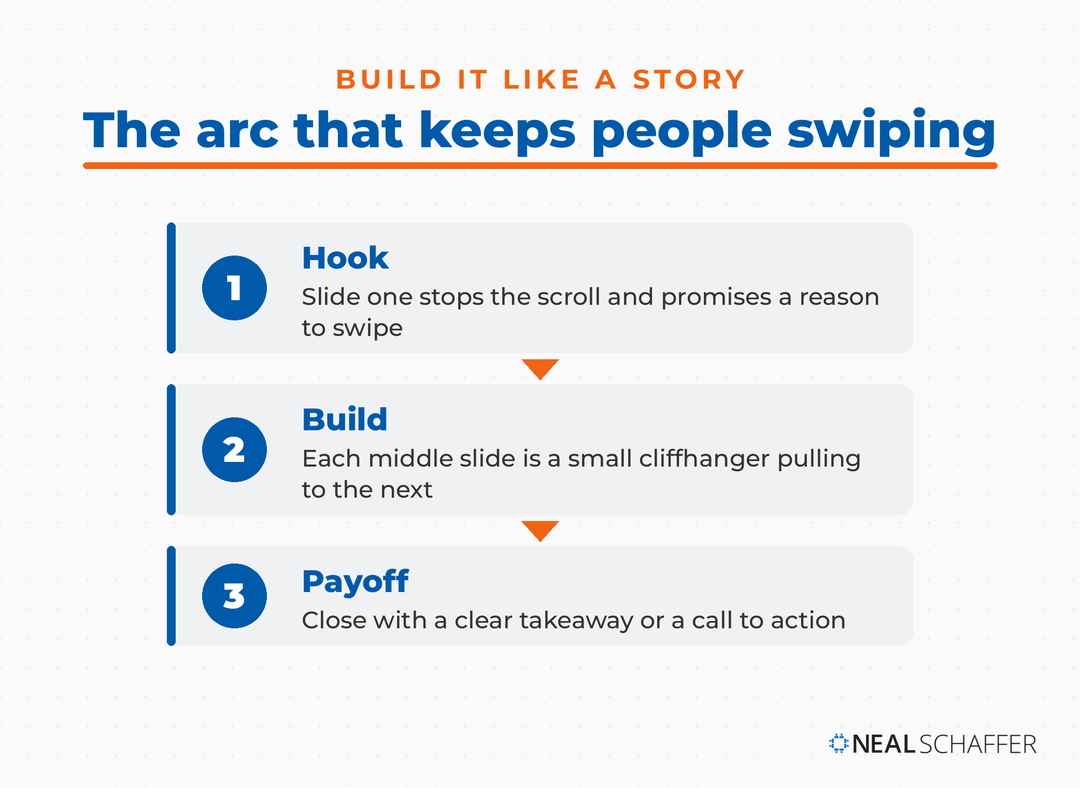 A slideshow that holds attention runs like a story: a hook that stops the scroll, middle slides that each earn the next swipe, and a payoff that lands the takeaway.
A few formats that consistently work:
| Slideshow format | Best for | Example first slide |
|---|
| Teaser or announcement | Launches, drops, news | “Something new drops Friday…” |
| Before and after | Transformations, results | “This took me 30 days…” |
| Tips or list | How-tos, education | “5 things I wish I knew…” |
| Social proof | Reviews, testimonials | “Customers keep saying this…” |
| Behind the scenes | Process, workspace, product | “How this actually gets made…” |
If you’re stuck for direction, my list of TikTok content ideas works just as well for photo posts as it does for video. And if you already publish carousels elsewhere, the concept from my book Digital Threads applies directly. Build one strong content asset, then weave it across every platform where your audience lives. A carousel you made for LinkedIn is a TikTok slideshow waiting to happen.
How do you get more reach from your TikTok slideshows?
You get more reach by treating the slideshow like a story engineered to hold attention. Lead with a scroll-stopping first slide, add a trending sound, use text to pace the reveal, and post when your audience is active. Reach on TikTok follows engagement, so anything that makes people swipe, linger, or comment helps your post travel further.
A few things that move the needle:
- Nail the first slide. It has to stop the scroll and promise a reason to swipe. This is your hook, and it does most of the heavy lifting.
- Add a trending sound. Even on a photo post, audio matters. A sound that fits the mood, or a trending track, gives your slideshow a better shot at distribution. You’ll usually add this in the app after uploading.
- Use text to control pacing. Text on each slide guides the reader and builds suspense between swipes.
- Post when your people are online. Timing still matters, so check the best times to post on TikTok for your audience.
- Use search-friendly captions and tags. Describe your slideshow in plain language and add relevant TikTok hashtags so it can surface in search as well as the For You feed.
- Be consistent. One brilliant slideshow won’t build an audience, but a steady stream of good ones will. That’s exactly why the format is so powerful. It’s fast enough to sustain. For more on distribution, see getting more views on TikTok.
Frequently Asked Questions
How many photos can you add to a TikTok slideshow? You can add up to 35 photos in a single Photo Mode post. Most people do best with fewer than that, since a tight sequence of well-chosen slides holds attention better than a long one that loses the reader halfway through.
Can you make a TikTok slideshow without showing your face? Yes, and that’s one of the biggest reasons the format has taken off. A slideshow is entirely photos, graphics, and text, so you never have to appear on camera. It’s a favorite among authors and camera-shy creators for exactly this reason.
Why is my TikTok Photo Mode not showing up? TikTok rolls Photo Mode out gradually, so the most common fix is updating your app to the latest version. If it still doesn’t appear, the feature may not have reached your account or region yet.
Are TikTok slideshows better than videos? Neither is universally better; they do different jobs. Video suits movement, demonstration, and personality, while slideshows suit sequential storytelling and work for people who don’t want to film. If being on camera is your barrier, a slideshow is the better format because it’s the one you’ll actually publish. You can also make a standard TikTok video and mix both.
Do TikTok slideshows still get views in 2026? Yes. Slideshows remain one of the most reliable organic formats on TikTok, especially in communities like BookTok, because they combine low production effort with high swipe-driven engagement.
Start Making TikTok Slideshows This Week
If video has been the thing keeping you off TikTok, Photo Mode removes the excuse. Open the app, pick a handful of photos or repurpose a carousel you already made, and post them as a slideshow. Do it a few times this week and watch which slideshows get the most swipes.
That feedback will teach you more than any guide can. Once you’re comfortable, treat TikTok as one channel in a bigger picture. If you want the platform basics beyond slideshows, start with how to use TikTok. And if you’d like help fitting TikTok into a coordinated content strategy, download a free preview of Digital Threads or reach out about Fractional CMO services. The format is easy. The consistency is where the wins are.
Actionable advice for your digital / content / influencer / social media marketing.
Join 13,000+ smart professionals who subscribe to my regular updates.