GA4 has been the only game in town since July 2023. And yet, I still hear from some who are frustrated, confused, or just clicking around hoping they find what they need.
If that’s you, you’re not alone. The transition from Universal Analytics to GA4 was rough for a lot of people. Many businesses did the bare minimum to get GA4 running and never went back to actually learn the platform.
Here’s the thing: GA4 is genuinely more powerful than Universal Analytics ever was. But it’s also fundamentally different. The data model changed. The reports changed. The logic behind how everything works changed.
As a Fractional CMO working with businesses on digital marketing strategy, I’ve had many conversations with businesses navigating this shift. I’ve also spent years teaching digital marketing at universities and writing about analytics on this blog. Whether you’re looking to finally understand GA4 properly or just need a clear reference for the key differences, this guide breaks down the six changes that actually matter for your marketing decisions.
Key Takeaways
? GA4 uses an event-based model while Universal Analytics relied on sessions, changing how you track and analyze user behavior
? Universal Analytics stopped collecting data on July 1, 2023; GA4 is now the only option for Google Analytics users
? GA4 offers free BigQuery integration previously locked behind the $150K+ GA360 paywall
? Machine learning powers GA4’s predictive metrics for purchase probability, churn, and revenue forecasting
? Privacy-first features like Consent Mode and cookieless tracking prepare your analytics for stricter regulations
Why Did Google Replace Universal Analytics with GA4?
Universal Analytics officially stopped collecting data on July 1, 2023. That was over two years ago now, but understanding why Google made this change helps explain GA4’s design philosophy.
The reason Google made this change comes down to three things:
Privacy regulations are tightening. GDPR, CCPA, and similar laws made Universal Analytics’ approach to data collection increasingly problematic. GA4 was built from the ground up with privacy controls that Universal Analytics couldn’t retrofit.
User behavior has changed. People don’t use the internet the way they did in 2012 when Universal Analytics launched. Multiple devices, app usage, fragmented journeys. The session-based model couldn’t keep up.
Machine learning capabilities. GA4’s architecture allows for predictive analytics and behavioral modeling that simply weren’t possible in the older platform.
If you’re still figuring out your marketing strategy in this new environment, the good news is that GA4’s capabilities actually give you better data for decision-making. Once you understand it.
What Is the Main Difference Between GA4 and Universal Analytics?
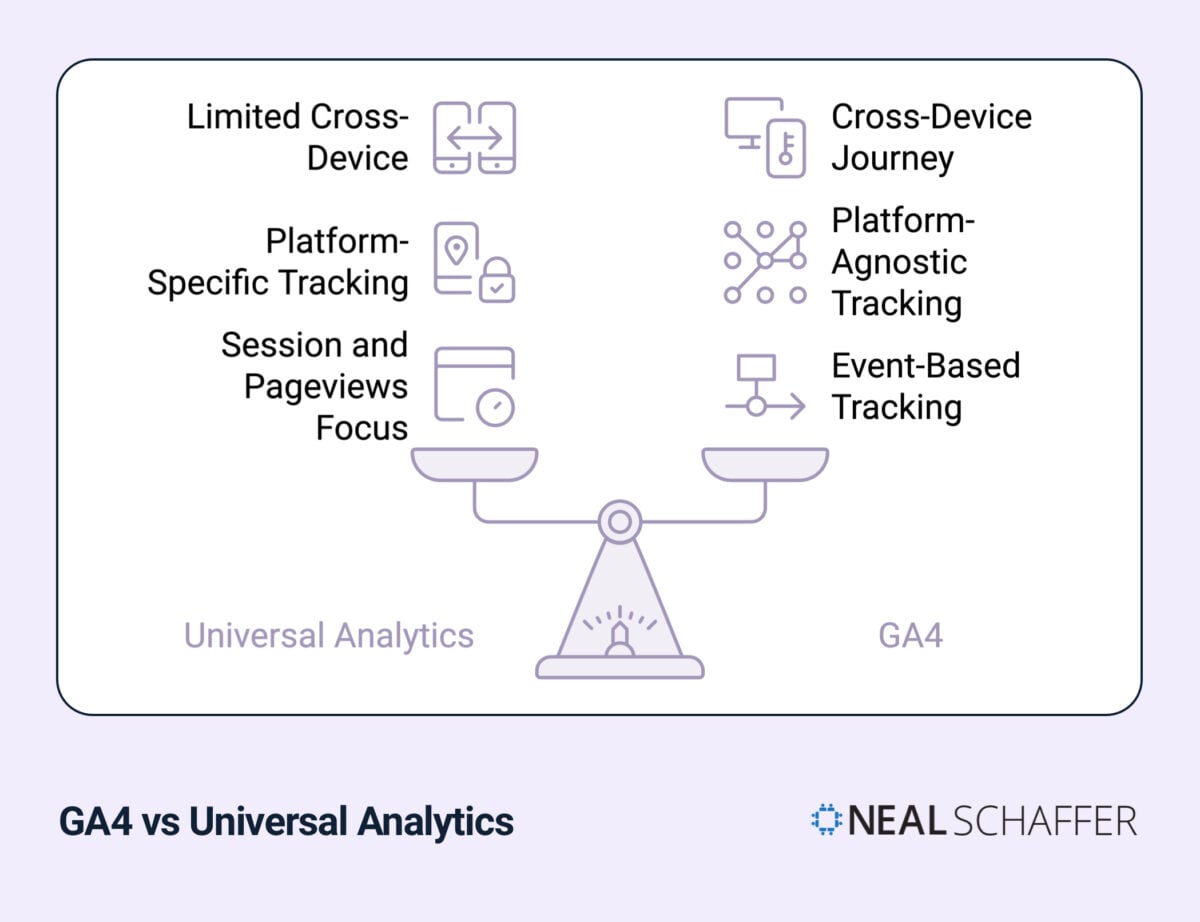
GA4 fundamentally changes how user interactions are tracked by switching from a session-based model to an event-based model. In Universal Analytics, data was organized around user sessions with a category-action-label structure. GA4 treats every interaction as an individual event with flexible parameters, providing more detailed tracking and better cross-device measurement.
This isn’t a minor technical tweak. It changes everything about how you’ll analyze your data.
Think about it this way: Universal Analytics asked “What happened during this visit?” GA4 asks “What actions did this user take across all their interactions with your brand?”
How the Event-Based Model Works
In Universal Analytics, you’d see data grouped into sessions. A user arrives, browses around, maybe fills out a form, and leaves. That’s one session with multiple page views and actions bundled together.
GA4 flips this approach. Every single interaction becomes its own event:
Is Your LinkedIn Not Delivering Results?
Just released: my new book to help professionals, entrepreneurs, and business owners maximize LinkedIn for real growth.
With years of LinkedIn expertise, Maximizing LinkedIn for Business Growth offers actionable steps to build your brand, expand your network, and drive results.
Start leveraging LinkedIn like never before—grab your copy now! Click the cover or button below to buy on Amazon.
- Page view? That’s an event.
- Button click? Event.
- Form submission? Event.
- Video play? Event.
| Tracking Element | Universal Analytics | GA4 |
|---|
| Data Structure | Session-based with pageviews | Event-based with parameters |
| User Interactions | Category-action-label format | Flexible event parameters |
| Cross-Device | Limited, property-specific | Unified user tracking |
| Automatic Tracking | Manual setup required | Enhanced measurement built-in |
The practical benefit? You get far more flexibility in how you track and analyze user behavior. And if you’re running marketing across multiple platforms (which, let’s be honest, you are), this matters a lot. For more on tracking your digital marketing analytics, I’ve written a detailed guide on the metrics that actually drive growth.
How Does GA4 Handle Cross-Platform Tracking Differently?
GA4’s enhanced measurement automatically tracks key user actions across websites and apps without requiring additional code. This unified approach solves one of Universal Analytics’ biggest limitations: stitching together user journeys that span multiple devices and platforms.
I see this issue constantly with my clients. Someone discovers your brand on mobile, researches on their laptop, and converts on their tablet. Universal Analytics treated these as three different users. GA4 can recognize it’s the same person.
What GA4 Tracks Automatically
Here’s what Enhanced Measurement captures without any setup:
| Feature | What It Tracks | Why It Matters |
|---|
| Scroll Tracking | 90% page scroll depth | Shows content engagement |
| Outbound Clicks | External link clicks | Monitors referral behavior |
| Site Search | Search terms used | Reveals user intent |
| Video Engagement | Play, progress, completion | Measures video ROI |
| File Downloads | PDF, doc, and other downloads | Tracks lead magnet performance |
This automatic tracking is huge for content marketing ROI measurement. You no longer need to manually configure every event you want to track.
The cross-device tracking also improves your attribution data significantly. If you’re trying to understand which marketing channels actually drive conversions, GA4 gives you a much clearer picture than Universal Analytics ever could.
What Are GA4’s Privacy Features and Why Do They Matter?
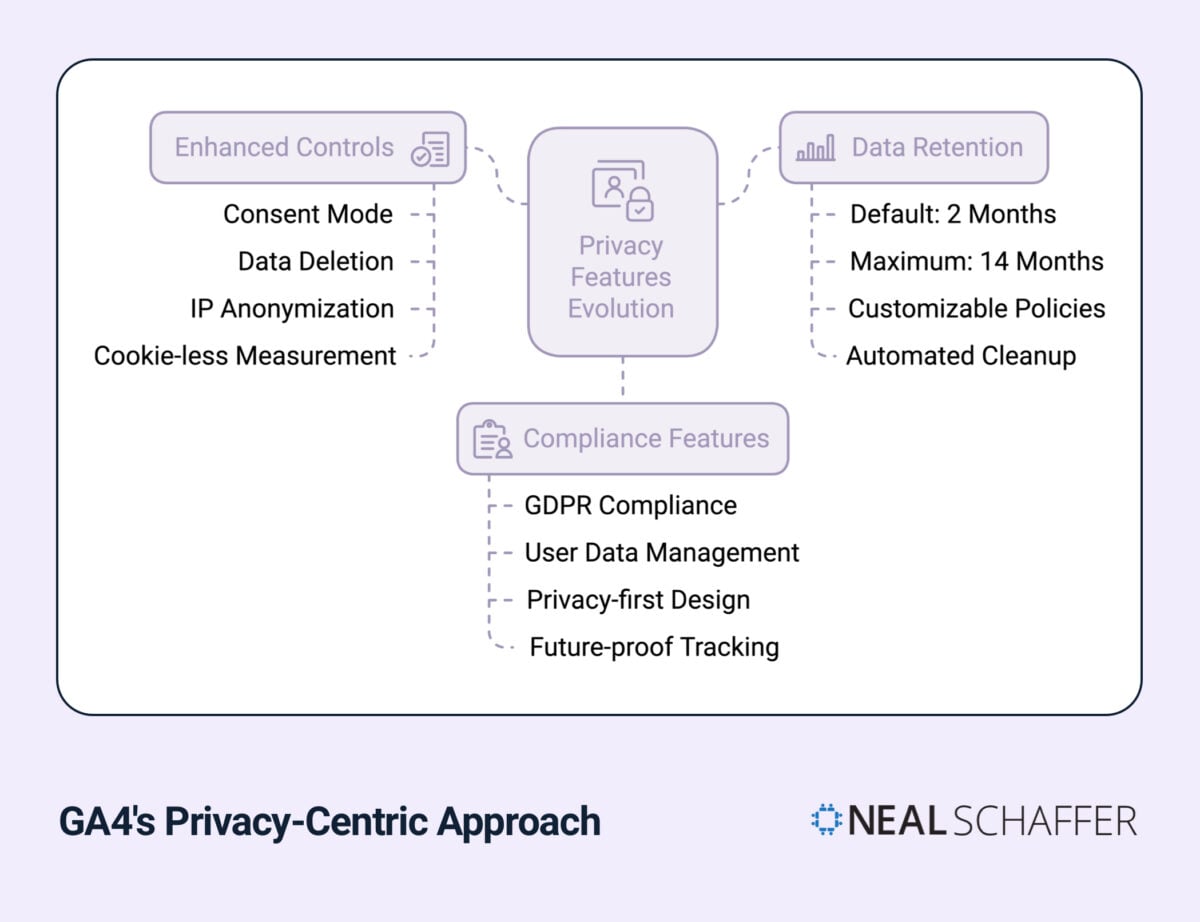
GA4 includes built-in privacy controls including Consent Mode, automatic IP anonymization, flexible data retention settings, and cookieless measurement capabilities. These features help businesses comply with GDPR, CCPA, and similar regulations while still collecting actionable analytics data.
Privacy isn’t just a compliance checkbox. It’s becoming a competitive advantage. Customers increasingly care about how their data is handled, and blogging laws and regulations around data collection are only getting stricter.
GA4 Privacy Controls Breakdown
| Privacy Feature | What It Does | Business Impact |
|---|
| Consent Mode | Adjusts tracking based on user consent | Maintains some data collection even when cookies are declined |
| IP Anonymization | Automatically masks IP addresses | Built-in GDPR compliance |
| Data Retention | 2 or 14 months (configurable) | Balances analysis needs with privacy |
| Data Deletion | Enables user data deletion requests | Simplifies right-to-be-forgotten compliance |
| Cookieless Tracking | Measures without third-party cookies | Future-proofs your analytics |
Consent Mode Explained
Google’s Consent Mode deserves special attention. When a user declines cookies, Universal Analytics would simply stop tracking them. GA4’s Consent Mode instead sends “cookieless pings” that provide aggregate data without storing personal information.
This means you don’t lose all measurement capability when users opt out. You get modeled data that fills in the gaps while respecting privacy choices.
If you’re serious about email marketing or any form of digital marketing that touches customer data, understanding these privacy features isn’t optional anymore.
How Does GA4 Use Machine Learning for Predictive Analytics?
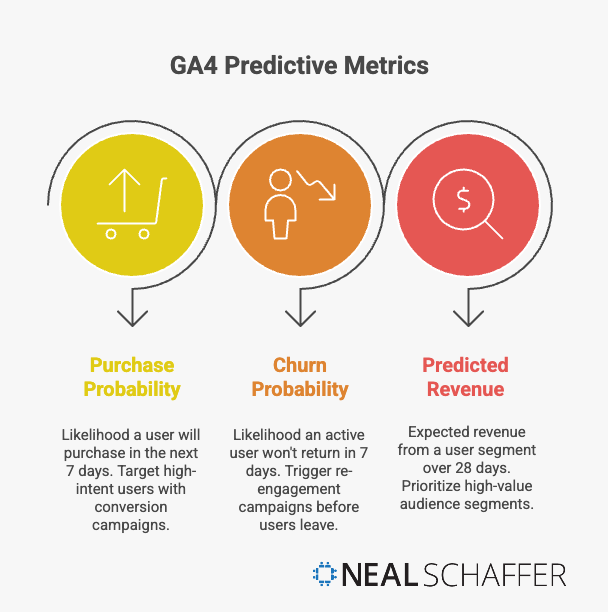
GA4 uses machine learning to provide three predictive metrics: purchase probability (likelihood to convert in the next 7 days), churn probability (likelihood a user won’t return in the next 7 days), and predicted revenue (expected spending from a user segment over 28 days). These AI-powered insights help marketers target the right audiences before they act.
This is a game-changing capability that simply didn’t exist in Universal Analytics. You’re no longer just looking at what happened. You’re getting data-driven predictions about what’s likely to happen next.
GA4’s Three Predictive Metrics
According to Google’s official documentation, GA4 automatically enriches your data with machine learning predictions:
| Predictive Metric | What It Measures | Marketing Application |
|---|
| Purchase Probability | Likelihood a user will purchase in the next 7 days | Target high-intent users with conversion campaigns |
| Churn Probability | Likelihood an active user won’t return in 7 days | Trigger re-engagement campaigns before users leave |
| Predicted Revenue | Expected revenue from a user segment over 28 days | Prioritize high-value audience segments |
How Behavioral Modeling Fills Data Gaps
Here’s where GA4 gets really interesting. With privacy regulations limiting traditional tracking, you’re going to have gaps in your data. That’s unavoidable.
GA4’s machine learning models analyze the data you do have and model the behavior patterns for users you can’t directly track. So if 30% of your visitors decline cookies, GA4 doesn’t just show you a 30% hole in your reports. It uses statistical modeling to estimate what that missing segment likely did.
Is it perfect? No. But it’s far better than the alternative of just missing that data entirely.
This capability matters a lot for businesses trying to understand their marketing ROI when traditional tracking becomes less reliable. The combination of predictive analytics and behavioral modeling gives you a more complete picture than raw data alone.
For practical ways to apply AI to your marketing beyond analytics, check out my guide on benefits of AI in marketing.
What Advanced Reporting Features Does GA4 Offer?
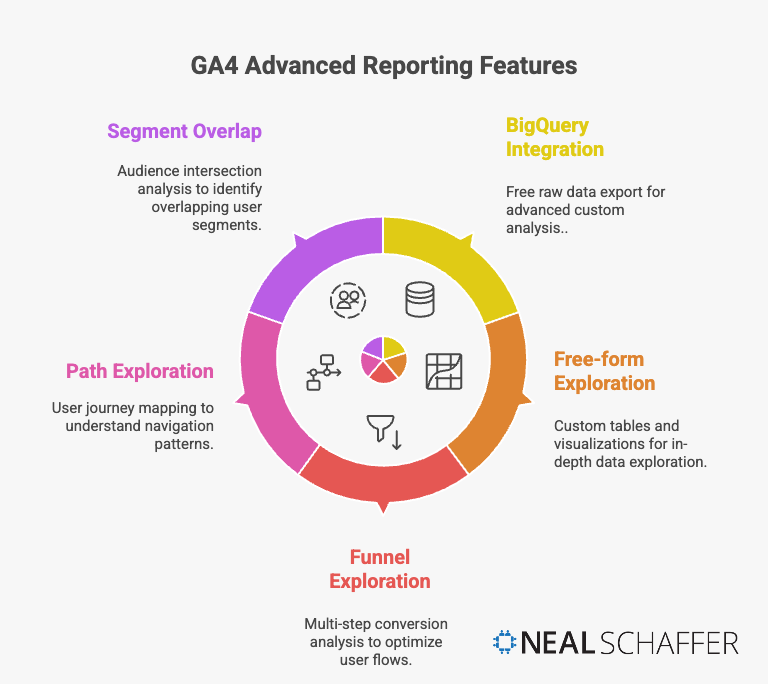
GA4 provides advanced analysis tools previously reserved for GA360 users (who paid $150,000+ annually), including Exploration reports, funnel analysis, path analysis, segment overlap, and free BigQuery integration. These features give every business enterprise-level analytics capabilities at no additional cost.
This democratization of advanced analytics is one of GA4’s most underappreciated benefits. Features that used to require a six-figure budget are now available to everyone.
Free BigQuery Integration
This one deserves special attention. In Universal Analytics, exporting raw data to BigQuery required GA360, which cost between $75,000 and $150,000 annually. Now it’s free.
Why does this matter? BigQuery lets you:
- Store data beyond GA4’s 14-month retention limit
- Run custom SQL queries on your raw analytics data
- Combine analytics data with other business data sources
- Build custom attribution models and analyses
If you’re serious about data-driven marketing, this integration opens up possibilities that were previously out of reach for most businesses.
Exploration Reports
GA4’s Exploration feature replaces the limited custom reports in Universal Analytics with flexible, drag-and-drop analysis tools:
| Exploration Type | What It Does | Best Used For |
|---|
| Free-form | Custom tables and visualizations | Ad-hoc analysis of any metrics |
| Funnel Exploration | Multi-step conversion analysis | Identifying where users drop off |
| Path Exploration | Visual user journey mapping | Understanding navigation patterns |
| Segment Overlap | Compare audience intersections | Finding high-value user segments |
| Cohort Exploration | Track user groups over time | Measuring retention and lifetime value |
These tools work well alongside your other digital marketing analytics efforts, giving you deeper insights into user behavior than Universal Analytics ever could.
How Should You Implement GA4 for Best Results?
Successful GA4 implementation requires defining clear measurement objectives tied to business goals, establishing consistent naming conventions for events and parameters, using debugging tools during setup, and conducting regular audits to maintain data accuracy. Treat implementation as an ongoing process, not a one-time project.
I’ve seen too many businesses rush their GA4 setup and end up with messy, unreliable data. Take the time to do it right.
GA4 Implementation Best Practices
1. Define Your Measurement Strategy First
Before touching any settings, decide what you actually need to measure. What are your key KPIs and metrics? What business questions do you need your analytics to answer?
GA4 gives you enormous flexibility in what you can track. That’s both a blessing and a curse. Without a clear strategy, you’ll end up tracking everything and learning nothing.
2. Create Consistent Naming Conventions
This sounds boring, but it will save you hours of frustration later. Establish clear naming rules for:
- Events (use snake_case like
form_submit or video_play) - Parameters (be descriptive:
form_name, video_title) - Custom dimensions and metrics
Document these conventions and make sure everyone on your team follows them.
3. Use DebugView During Setup
GA4’s DebugView lets you see events firing in real-time as you test your implementation. Use it. Every time you add or modify tracking, verify it’s working correctly before assuming you’re collecting good data.
4. Set Your Data Retention to 14 Months
GA4 defaults to 2-month data retention. Change this to 14 months immediately. There’s no good reason to use the shorter setting unless you have specific compliance requirements.
5. Audit Regularly
Your tracking will break. Pages get updated, developers make changes, third-party tools conflict with your setup. Schedule quarterly audits to verify your most important events are still tracking correctly.
| Implementation Phase | Key Actions | Common Mistakes to Avoid |
|---|
| Planning | Define KPIs, map user journeys | Tracking everything without strategy |
| Setup | Configure events, set retention | Using default 2-month retention |
| Testing | Use DebugView, verify events | Assuming setup works without testing |
| Maintenance | Regular audits, documentation | Set-and-forget mentality |
For more guidance on tracking your marketing performance, my SEO checklist covers the metrics that matter for search visibility.
GA4 vs Universal Analytics: Quick Comparison
Here’s a side-by-side summary of the major differences:
| Feature | Universal Analytics | GA4 |
|---|
| Data Model | Session-based | Event-based |
| Cross-Device Tracking | Limited | Unified user identity |
| Machine Learning | None | Predictive metrics built-in |
| Privacy Controls | Basic | Consent Mode, cookieless tracking |
| BigQuery Export | GA360 only ($150K+/year) | Free for all users |
| Data Retention | Customizable | 2 or 14 months max |
| Enhanced Measurement | Manual setup | Automatic tracking |
| Status | Sunset July 1, 2023 | Current platform |
Frequently Asked Questions
Can I still access my Universal Analytics data? No. Google has fully deprecated Universal Analytics, and historical data is no longer accessible. If you didn’t export your UA data before the cutoff, it’s gone. This is why backing up historical data was critical during the transition period.
Why do my GA4 numbers look different from Universal Analytics? GA4 and Universal Analytics measure things differently. Sessions, users, and conversions are all calculated using different methodologies. The event-based model in GA4 typically shows different (not wrong) numbers. Don’t try to match them exactly.
Do I need GA360 to get advanced features in GA4? No. Many features that required GA360 in Universal Analytics (like BigQuery export and advanced analysis tools) are now free in standard GA4. GA360 still exists for enterprises needing higher data limits and SLAs, but most businesses won’t need it.
How long does GA4 keep my data? GA4’s maximum data retention is 14 months for user-level data in Explorations. Standard reports use aggregated data that isn’t subject to retention limits. For longer storage, export to BigQuery.
Is GA4 GDPR compliant? GA4 includes privacy features designed for GDPR compliance, including Consent Mode, IP anonymization, and data deletion capabilities. However, compliance depends on how you implement and configure these features. GA4 provides the tools; proper setup is your responsibility.

Moving Forward with GA4
GA4 isn’t new anymore. It’s the established standard. If you’ve been putting off really learning it, now’s the time.
Yes, GA4 has a learning curve. The interface is different, the data model takes adjustment, and some things that were simple in Universal Analytics require rethinking. But the capabilities GA4 offers, from predictive analytics to cross-device tracking to privacy-ready measurement, are genuinely better for modern marketing.
Here’s my advice: stop comparing GA4 to Universal Analytics and start learning GA4 on its own terms. The businesses that adapt fastest will have a real advantage in understanding their customers and optimizing their marketing strategy.
If you’re still getting comfortable with GA4, focus on these priorities:
- Verify your setup is correct. Use DebugView to confirm your key events are tracking.
- Extend your data retention. Change from 2 months to 14 months immediately.
- Learn Explorations. This is where GA4’s real power lives.
- Set up BigQuery export. Even if you don’t use it today, you’ll want the historical data later.
The future of analytics is privacy-first, AI-powered, and event-based. GA4 is built for that future. The sooner you get comfortable with it, the better positioned you’ll be to make smart, data-driven marketing decisions.
What questions do you have about GA4? Contact me, and I’ll do my best to help.
Actionable advice for your digital / content / influencer / social media marketing.
Join 13,000+ smart professionals who subscribe to my regular updates.